

Getting started#
Polypix turns directions and spherical regions into HEALPix cell IDs. Install it with:
pip install polypix
NumPy is the only runtime dependency. See Installation if you need to build from source.
Directions in, cell IDs out#
Numeric inputs are Cartesian directions shaped like (3,) or (N, 3). They don’t have
to be unit length; Polypix ignores their magnitude. The coordinate frame is
also yours to choose. Polypix doesn’t attach a frame or transform coordinates.
For example, these helpers convert between longitude/latitude in degrees and Cartesian directions:
>>> import numpy as np
>>> import polypix as px

>>> def unit_vector(lon_deg, lat_deg):
...     lon, lat = np.radians(lon_deg), np.radians(lat_deg)
...     return np.stack((
...         np.cos(lat) * np.cos(lon),
...         np.cos(lat) * np.sin(lon),
...         np.sin(lat),
...     ), axis=-1)

>>> def to_lonlat(vectors):
...     lon = np.degrees(np.arctan2(vectors[..., 1], vectors[..., 0]))
...     lat = np.degrees(np.arcsin(np.clip(vectors[..., 2], -1, 1)))
...     return np.stack((lon, lat), axis=-1)
Cover circles#
Pass a center direction and an angular radius in radians to cover_cap():
>>> cap_lon, cap_lat = [-7.5, 8.0], [3.0, -4.0]
>>> cap_radius_deg = [6.0, 4.0]
>>> cap_coverage = px.cover_cap(
...     unit_vector(cap_lon, cap_lat), np.radians(cap_radius_deg), resolution=4
... )
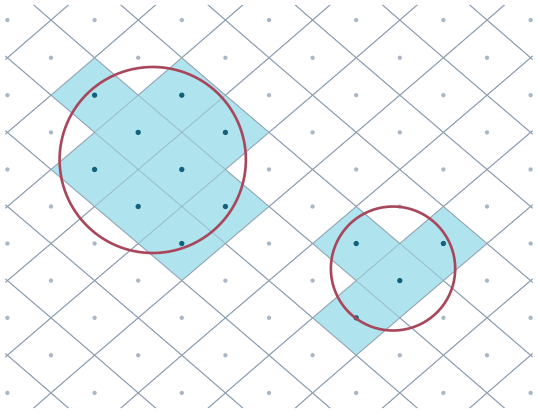
Two spherical caps and the cells cover_cap() returns.#
The result contains one segment per input circle. len(cap_coverage) is the
number of input regions, and cap_coverage[i] is the cell-ID array for region
i.
>>> len(cap_coverage)
2
>>> first_cap_cells = cap_coverage[0]
>>> segment_boundaries = cap_coverage.offsets
Cover polygons#
Give cover_polygon() the vertices in boundary order. Consecutive vertices are
joined by the shorter great-circle arc:
>>> scene_lon = [-9.0, 7.0, 11.0, -2.0]
>>> scene_lat = [-6.0, -8.0, 4.0, 8.0]
>>> scene_coverage = px.cover_polygon(
...     unit_vector(scene_lon, scene_lat), resolution=4
... )
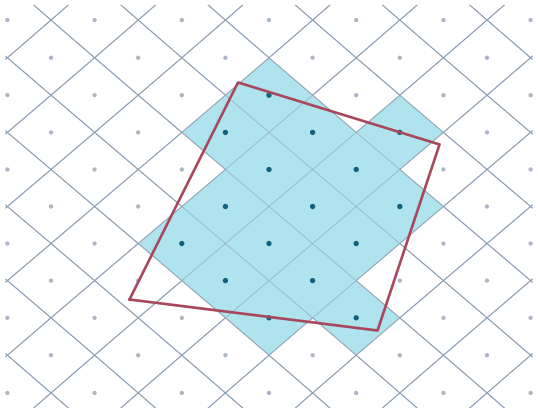
A polygon footprint and the cells it covers.#
cover_polygon() also accepts GeoJSON-like mappings and objects with a
__geo_interface__. Those coordinates are longitude and latitude in decimal
degrees. Reproject them yourself first; the interface carries no reliable CRS.
>>> geojson_polygon = {
...     "type": "Polygon",
...     "coordinates": [[
...         [-9.0, -6.0], [7.0, -8.0], [11.0, 4.0], [-2.0, 8.0], [-9.0, -6.0]
...     ]],
... }
>>> geo_coverage = px.cover_polygon(geojson_polygon, resolution=4)
For several polygons, pass a sequence or a dense array shaped
(regions, vertices, 3). A Polygon can include holes, and a MultiPolygon
can contain separate components. Each input region still produces one segment.
Cover a swath#
For a long, thin region, give cover_sweep() the sampled left and right edges.
Each pair of consecutive samples becomes one quadrilateral:
>>> track_lon = np.linspace(-13.0, 13.0, 7)
>>> track_lat = 5 * np.sin(np.radians(track_lon * 7))
>>> left_edge = unit_vector(track_lon, track_lat + 3.2)
>>> right_edge = unit_vector(track_lon, track_lat - 3.2)
>>> swath_coverage = px.cover_sweep(left_edge, right_edge, resolution=4)
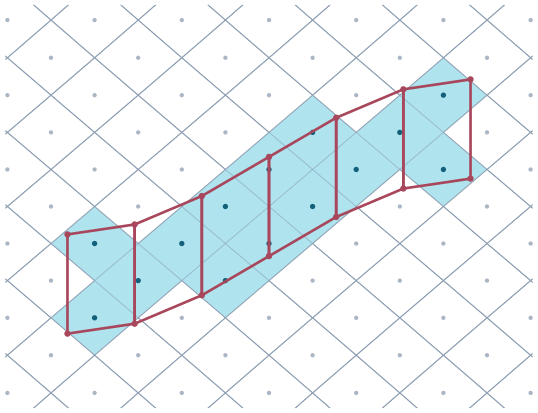
Each pair of samples becomes one quadrilateral and one result segment.#
Sample densely enough that the great-circle arcs between samples follow the swath you mean.
Center or overlap?#
By default, a cell is selected when its center is inside the region:
>>> center = unit_vector(-7.5, 3.0)
>>> radius = np.radians(6.0)
>>> center_coverage = px.cover_cap(center, radius, resolution=8)
This is fast, but a region smaller than a cell can return no cells. Use
mode="overlap" when every touched cell must be included:
>>> overlap_coverage = px.cover_cap(
...     center,
...     radius,
...     resolution=8,
...     mode="overlap",
... )
Overlap mode costs more, especially for detailed polygons. The same option is
available on cover_polygon() and cover_sweep(). See How it works
for the exact rules.
Assign points to cells#
For pointings, sample points, or a ground track, use cell_at():
>>> point_lon = [-11.0, -3.0, 5.0, 12.0]
>>> point_lat = [6.0, -7.0, 2.0, -9.0]
>>> point_cells = px.cell_at(
...     unit_vector(point_lon, point_lat), resolution=4
... )
cell_centers() gives the representative direction for those cells. It does
not recover the original directions:
>>> point_centers = px.cell_centers(point_cells, resolution=4)
>>> lonlat = to_lonlat(point_centers)
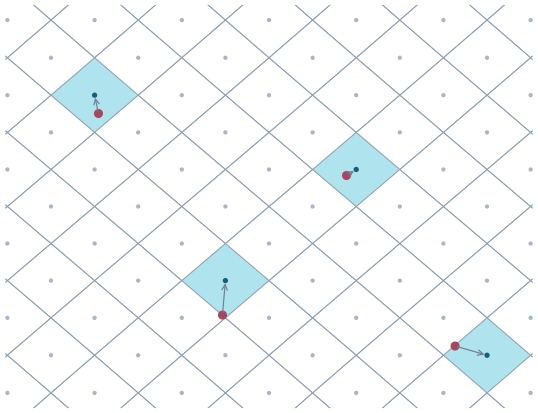
cell_at() returns the cell; cell_centers() returns its representative center.#
Use cell_neighbors() when you need the cells touching a set of cells at an
edge or corner. The input cells themselves aren’t included:
>>> neighbors = px.cell_neighbors(point_cells, resolution=4)
Count or sum over cells#
Coverage keeps the cell IDs in one flat cells array and uses offsets to
separate the input regions. Reduce it when you want one value per cell:
>>> counts = cap_coverage.reduce(px.Count())
Because HEALPix cells have equal area, these counts can be compared directly.
For weights or durations, use Sum:
>>> values = np.array([2.0, 1.5])
>>> exposure = cap_coverage.reduce(px.Sum(values))
If you only need counts, ask for them during covering. This avoids creating the individual region-cell hits:
>>> counts = px.cover_cap(
...     unit_vector(cap_lon, cap_lat),
...     np.radians(cap_radius_deg),
...     resolution=8,
...     reduce=px.Count(),
... )
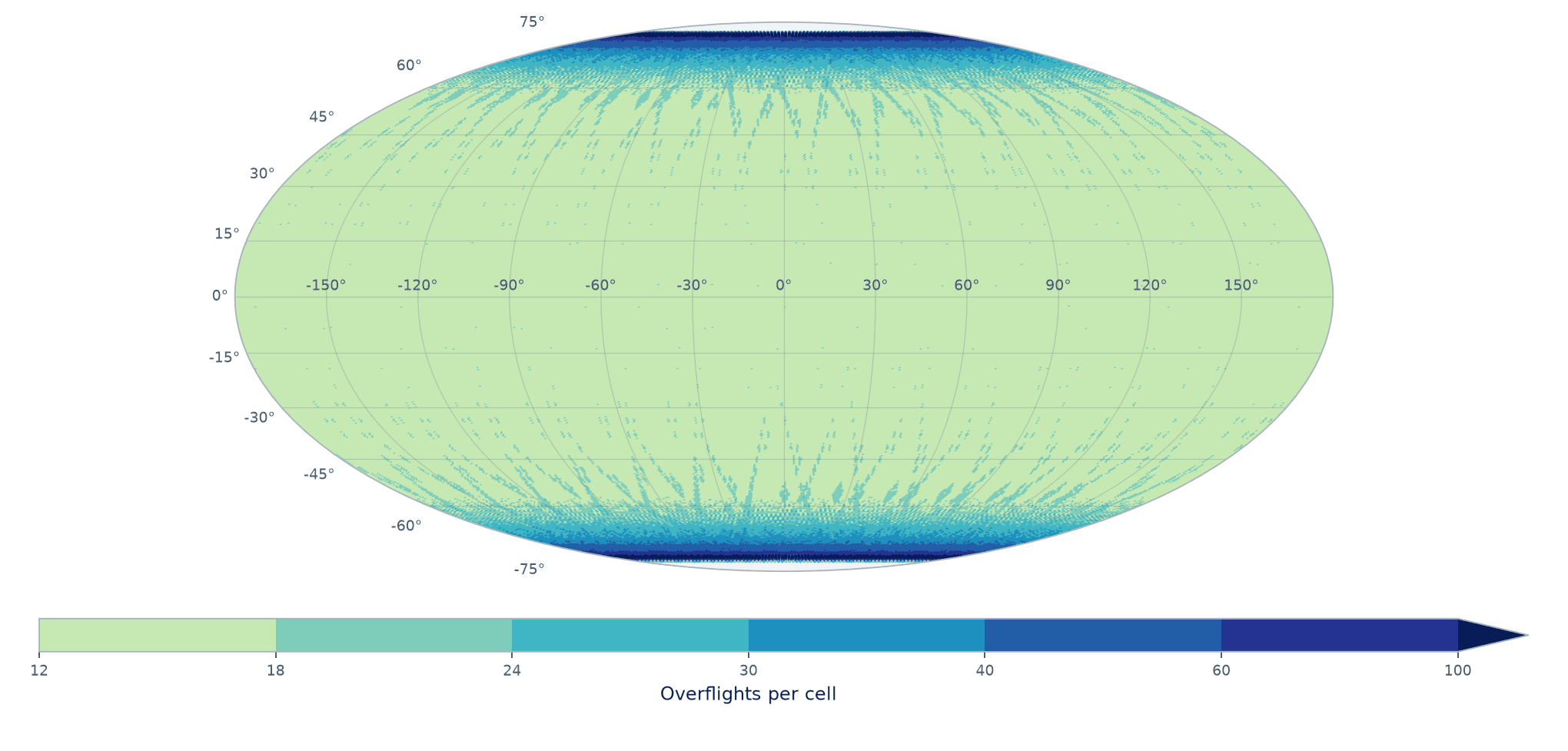
Cell counts can be plotted directly as a global map.#
For a small set of cells at a high resolution, add candidate_cells:
>>> site_cells = px.cell_at(unit_vector(cap_lon, cap_lat), resolution=20)
>>> site_counts = px.cover_cap(
...     unit_vector(cap_lon, cap_lat),
...     np.radians(cap_radius_deg),
...     resolution=20,
...     candidate_cells=site_cells,
...     reduce=px.Count(),
... )
>>> site_counts.shape == site_cells.shape
True
Without a reducer, candidate cells are a set: output is sorted and duplicates are removed. With a reducer, they define the result’s index space, so order and duplicates are preserved. Without candidates, a reducer returns a dense grid:
>>> requested = np.array([7, 2, 7])
>>> px.cover_cap([1, 0, 0], np.pi, resolution=0, candidate_cells=requested).cells.tolist()
[2, 7]
>>> px.cover_cap(
...     [1, 0, 0], np.pi, resolution=0, candidate_cells=requested, reduce=px.Count()
... ).tolist()
[1, 1, 1]
>>> px.cover_cap([1, 0, 0], np.pi, resolution=0, reduce=px.Count()).shape
(12,)
See Performance for resolution, memory, batching, and thread choices.
Revisit statistics#
When coverage segments are consecutive time bins, revisit() summarizes when
each cell was occupied:
>>> stats = px.revisit(swath_coverage)
>>> cadence_minutes = 1.0
>>> gap_count = stats.visit_counts - 1
>>> mean_internal_gap_minutes = np.full(gap_count.shape, np.nan)
>>> measured = gap_count > 0
>>> mean_internal_gap_minutes[measured] = (
...     stats.gap_steps_total[measured] / gap_count[measured]
... ) * cadence_minutes
The bins are ordinal. Map stats.first_bin, stats.stop_bin, and the gap
fields to your own timestamps. Matching segment indices must describe matching
time boundaries; Polypix has no clock to check that for you. Multiplying step
counts by a cadence, as above, is valid only for uniformly spaced bins.
For persistence, see the runnable
examples/coverage_archive.py
example, which stores the two Coverage arrays and reconstructs them with
validation on load.