

How it works#
This page covers the rules behind Polypix’s results. The getting started guide shows the calls; Performance covers the choices that affect speed and memory.
Resolution and cell IDs#
Polypix uses HEALPix: an equal-area grid on the sphere. Each increase in
resolution splits every cell into four. Cell centers lie on latitude rings,
and Polypix returns ordinary HEALPix IDs in fixed-resolution RING order.
The IDs are signed int64 values in
[0, cell_count(resolution)). They don’t contain the resolution, so keep the
resolution with them. A cell ID from one resolution isn’t meaningful at
another.
Equal-area cells mean counts can be compared directly. RING order also means a region usually appears as short contiguous spans along the rings it touches.
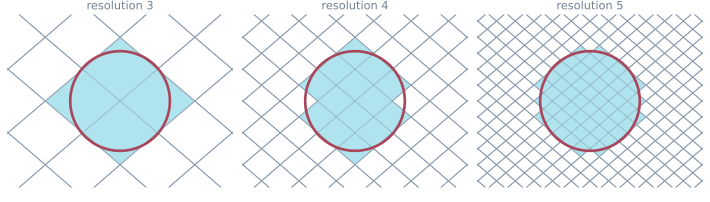
Each resolution divides every cell into four.#
Resolution 12 already needs about 1.5 GiB for one int64 per cell. High
resolutions are meant for small regions and selected cells, not a dense global
map. Resolutions has the cell sizes and memory estimates.
Polypix only uses RING IDs. For nested ordering, interpolation, resampling, map algebra, or file formats, pass the IDs to a fuller HEALPix library such as healpy, astropy-healpix, or cdshealpix.
Direction geometry#
The numeric API takes Cartesian directions shaped like (3,) or (N, 3). They can be
unit vectors or position vectors; Polypix ignores their magnitude. You choose
the frame, such as Earth-fixed or celestial, and every vector in a call must
use the same one. Polypix doesn’t store or transform frame, datum, unit,
or epoch information.
That is why longitude seams and poles need no special handling. If another
library gives you component-major arrays shaped (3, N), move the axis before
calling Polypix:
vectors_n3 = np.moveaxis(vectors_3n, 0, -1)
cells = px.cell_at(vectors_n3, resolution=8)
cover_polygon() has one extra input form: a polygonal __geo_interface__
object or mapping. Its coordinates are longitude and latitude in decimal
degrees, interpreted directly as angles on a unit sphere. The interface has no
reliable CRS, so projected geometry must be transformed upstream.
cell_centers() returns a cell’s representative direction. It does not recover
the direction that produced the cell. Only a cell center maps back to the same
cell exactly; an arbitrary direction near a cell edge is subject to floating-
point tie-breaking.
Center-sampled coverage#
The default coverage rule is simple: a cell is selected when its center is inside the cap or footprint, including the boundary.
That means:
a region smaller than a cell can return no cells;
a cell touched by an edge is left out when its center is outside;
this is not a conservative spatial index.
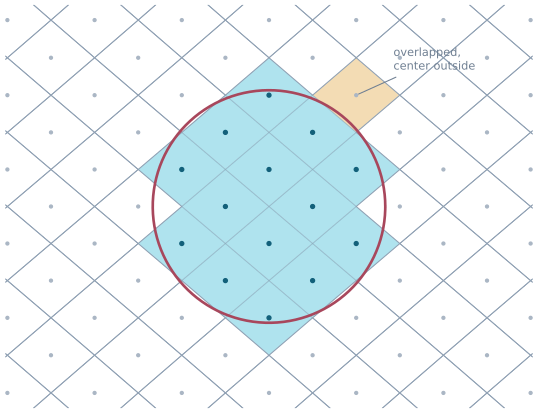
Center sampling can leave out a cell that the region touches.#
Use mode="overlap" when every touched cell should count. Polypix checks the
curved HEALPix cell boundary, includes tangency, and returns a superset of the
center-selected result:
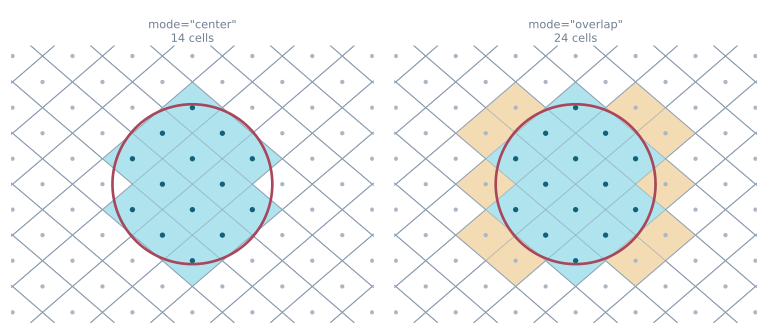
Overlap mode adds cells touched by the region, even when their centers are outside.#
The tradeoff is that a tiny touch counts as a whole cell, and the boundary
check costs more. The rule applies to cover_cap(), cover_polygon(), and
cover_sweep().
Batches and segments#
The covering functions accept batches but return one Coverage object. It has
one flat cells array and an offsets array describing the input boundaries:
cells for item i = cells[offsets[i] : offsets[i + 1]]
So len(coverage) is the number of inputs, while coverage[i] is a read-only
view of the cells for input i. This keeps the result compact without losing
which cells came from which region.
The input-to-segment rules are:
one cap gives one segment;
each polygon gives one segment, including a multipart polygon;
each pair of adjacent sweep samples gives one segment.
cover_sweep() joins adjacent samples with the shorter great-circle arc.
Sample densely enough that this is the swath edge you intended. Steps close to
180 degrees are a warning sign; an exactly ambiguous step is rejected.
Occupancy over time#
revisit() treats coverage segments as ordered bins. It reports when each cell
was occupied, including run counts and gaps. The bins are positions, not
timestamps, because a Coverage has no clock:
stats = px.revisit(coverage)
Map first_bin, stop_bin, and the gap fields to your own time edges. Make
sure consecutive segments really are adjacent in time. Insert an empty bin or
split the analysis at a gap so a run cannot cross a discontinuity.
With several sources, pass aligned coverages together and use
minimum_sources to require simultaneous coverage. Segment indices must refer
to the same time boundaries, and Polypix cannot check that for you. Thresholding
also drops source identity; keep separate coverages when you need to know which
source saw a cell.
The result is sparse and sorted by cell ID. A sampled sweep describes occupied bins, not exact access events, so the accuracy of the result depends on the sampling cadence.
Passing cells to other libraries#
Polypix exchanges Cartesian direction arrays and fixed-resolution RING IDs. It doesn’t provide a frame model or a complete HEALPix toolkit. IDs can be handed to healpy, astropy-healpix, or cdshealpix for ordering conversion, interpolation, resampling, and map formats.
One detail matters when converting geometry: cell_corners() returns four
corner directions, but the real HEALPix edges are curved. Those corners are not
an exact great-circle polygon boundary. Likewise, center-selected cells and
overlap-selected cells mean different things when turned into a MOC; use
mode="overlap" for an upper cover of the supplied region.